
Introduction
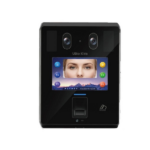
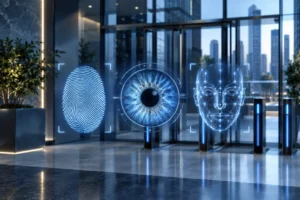
An iris scanner is a biometric device that captures and compares the unique pattern in the coloured ring around the pupil of a human eye. An iris scanner offers contactless authentication even when the user wears glasses, a mask, a niqab or hijab, making it well suited for high-security sites and border control. The UBio-X Iris multimodal terminal is available in the United Arab Emirates from ubio.ae, combining iris, fingerprint and card authentication in a single device.
This guide explains how an iris scanner works, compares iris recognition to retina scanning and other biometrics, and outlines the key technical and regulatory factors to check when selecting an iris recognition system for access control in the UAE.
How an Iris Scanner Works
Iris recognition cameras typically use near-infrared illumination to capture the iris pattern (FBI Biometric Center of Excellence). The camera records the arrangement of features that make up each iris and converts the captured image into a mathematical template. The system then compares that template against those stored in its database or on a server.
The iris pattern forms before birth and generally stays stable from early childhood through life, though pigmentation can change (IrisGuard). Identical twins have different iris patterns, and a person’s left and right irises also differ, giving each iris a unique biometric signature. The UBio-X Iris recognizes the iris at distances up to 50 cm and has an auto-tilting camera with automatic height and angle adjustment that finds the iris (Union Biometrics UBio-X Iris).
Iris Scanner vs Retina Scanner vs Eye Scanner
The terms iris scanner, retina scanner and eye scanner are sometimes confused, but they describe different technologies. An iris scanner captures the pattern in the coloured ring around the pupil. Retinal scanning maps the blood-vessel pattern on the retina at the back of the eye and generally requires the eye to be positioned very close to an eyepiece (FBI Biometric Center of Excellence).
Eye scanner is a generic term that people use loosely. When evaluating a system, always confirm whether it captures the iris or the retina and check the working distance. A true iris scanner operates at a comfortable distance and does not require the user to press against an eyepiece.
Iris vs Face vs Fingerprint Recognition
Choosing between iris, face and fingerprint biometrics depends on the security level required, the working environment and user demographics. The table below compares key characteristics of each modality.
| Feature | Iris | Face | Fingerprint |
|---|---|---|---|
| Contact | Contactless | Contactless | Touch required |
| What is captured | Pattern in the coloured ring around the pupil | Facial features and geometry | Ridge pattern on fingertip |
| Works with glasses, masks, PPE, niqab, hijab | Yes (UBio-X Iris) | — | — |
The UBio-X Iris supports iris, fingerprint and card authentication, letting administrators choose the best method for each zone or user group (Union Biometrics UBio-X Iris). For further comparison of face and fingerprint technologies, see the fingerprint vs face recognition guide and the overview of types of biometric devices.
What to Check When Buying an Iris Scanner
Standards and image quality. Look for compliance with ISO/IEC 19794-6:2011, which specifies iris image interchange formats for biometric enrolment, verification and identification (ISO 19794-6:2011). ISO/IEC 29794-6:2015 specifies methods and requirements for quantifying iris image quality (ISO 29794-6:2015). High image quality ensures reliable matching and interoperability with other systems.
Recognition distance and working height. A practical iris scanner should operate at a comfortable standoff distance without requiring users to lean in. The UBio-X Iris recognizes the iris at distances up to 50 cm and uses an auto-tilting camera with automatic height and angle adjustment (Union Biometrics UBio-X Iris). This range accommodates users of varying heights and reduces queue delays.
User capacity and speed. Check the system’s capacity for both iris users and templates. The UBio-X Iris has a capacity of 20,000 iris users in 1:N mode, 40,000 iris templates in 1:N mode, and 100,000 fingerprint templates in 1:N mode, and identifies against 40,000 iris templates in under 1 second (Union Biometrics UBio-X Iris; Union Biometrics catalog). Fast identification is essential for high-traffic entry points.
Accuracy and error rates. Compare the False Rejection Rate and the False Acceptance Rate. The UBio-X Iris achieves an FRR of 0.1 percent and an FAR of 0.0001 percent (Union Biometrics catalog), meaning very few legitimate users are rejected and the risk of an impostor being accepted is extremely low.
Personal protective equipment and cultural wear. Confirm that the scanner works when users wear glasses, masks, protective clothing, niqab or hijab. The UBio-X Iris is designed to authenticate users wearing glasses, masks, protective clothing, niqab or hijab (Union Biometrics UBio-X Iris).
Eye safety. Near-infrared illumination must comply with photobiological safety standards. IEC 62471 evaluates the photobiological eye and skin safety of non-laser lamps, lamp systems and LEDs over 200 to 3000 nm, and can be used to assess near-infrared illumination such as that in iris cameras (IEC 62471). Check whether the device provides IEC 62471 documentation.
UBio-X Iris Technical Specifications
The table below summarizes the key specifications of the UBio-X Iris multimodal terminal.
| Specification | Value |
|---|---|
| Authentication modes | Iris, fingerprint, card |
| Recognition distance | Up to 50 cm |
| Camera adjustment | Auto-tilting with automatic height and angle |
| Iris users (1:N) | 20,000 |
| Iris templates (1:N) | 40,000 |
| Fingerprint templates (1:N) | 100,000 |
| Identification speed | Under 1 second (40,000 iris templates) |
| FRR | 0.1% |
| FAR | 0.0001% |
| Display | 5-inch colour touch |
| Communication | TCP/IP, USB |
| Server software | UBio Alpeta |
| Suitable for users wearing | Glasses, masks, protective clothing, niqab, hijab |
The terminal communicates over TCP/IP and USB, and integrates with UBio Alpeta software for centralized user management and reporting (Union Biometrics UBio-X Iris). For a detailed contactless iris recognition guide, visit the UBio X Iris contactless iris recognition guide.
Where Iris Scanners Fit in UAE Access Control
The United Arab Emirates has a long history of deploying iris recognition for border security. The UAE piloted iris-based border screening of expelled foreigners in 2001 and rolled it out nationally in 2003, comparing arriving travellers against the database to detect re-entry (National Defense Magazine). Today, GDRFA Dubai operates smart gates at Dubai International Airport that use biometric verification, including iris and face recognition, for registered eligible passengers (GDRFA Dubai).
Beyond airports and border posts, iris scanners offer contactless, mask-friendly authentication that can work with cultural attire. Multimodal terminals such as the UBio-X Iris add flexibility by offering iris, fingerprint scanner and card modes, allowing each site to tailor authentication policy to the risk level of each zone.
Iris Scanner FAQ
What is the difference between an iris scanner and a retina scanner?
An iris scanner captures the pattern in the coloured ring around the pupil of the eye. Retinal scanning maps the blood-vessel pattern on the retina at the back of the eye and generally requires the eye to be positioned very close to an eyepiece.
Can an iris scanner work if the user wears glasses?
Yes. The UBio-X Iris is designed to authenticate users wearing glasses.
Does an iris scanner work when the user wears a face mask or niqab?
Yes. Because the iris scanner captures the eye, it is not affected by face coverings. The UBio-X Iris is designed to authenticate users wearing masks, niqab or hijab.
How accurate is the UBio-X Iris?
The UBio-X Iris has a False Rejection Rate of 0.1 percent and a False Acceptance Rate of 0.0001 percent. This means the system very rarely rejects a legitimate user and the chance of an impostor being accepted is extremely low.
Is the near-infrared light used by iris cameras safe for the eyes?
IEC 62471 evaluates the photobiological eye and skin safety of non-laser lamps, lamp systems and LEDs over 200 to 3000 nm, and can be used to assess the near-infrared illumination in iris cameras. Check whether the device provides IEC 62471 documentation.
Sources
- Union Biometrics — UBio-X Iris
- Union Biometrics catalog
- ISO/IEC 19794-6:2011
- ISO/IEC 29794-6:2015
- IEC 62471
- FBI Biometric Center of Excellence — Iris Recognition
- IrisGuard — How Iris Recognition Works
- National Defense Magazine — Biometrics Systems Help Strengthen Border Security in Persian Gulf Nation
- GDRFA Dubai — Smart Gates